
If a hospital can’t restore patient data fast, backup has failed. In healthcare, downtime can delay lab work, slow medication checks, cancel procedures, and push staff onto paper. One figure in the article says outages cost about $79,000 per hour, and patient-safety reports show that 48% of downtime incidents involved lab orders or results.
Here’s the short version: I’d treat healthcare backup and recovery as a patient care, compliance, and downtime issue at the same time. That means setting RTO and RPO by clinical risk, mapping system dependencies before an outage, keeping immutable/offsite copies, restoring systems in the right order, and testing restores on a set schedule.
At a glance, the article comes down to this:
- HIPAA requires contingency planning, including backup, disaster recovery, emergency mode work, testing, and system criticality review.
- Not every system needs the same recovery target. ICU monitoring, EHR, lab, pharmacy, billing, and HR should not all sit in one bucket.
- Backups alone are not enough. If restore steps, offline runbooks, and sign-off rules are missing, recovery can stall.
- Recovery order matters. Identity, network, storage, and security tools often need to come back before clinical apps will work.
- Restore testing is where weak spots show up. A backup job is not proof that recovery will work under pressure.
What I like about the piece is its main point: the goal is not just to store copies of data. The goal is to restore safe care fast, with clear priorities, clean backup copies, and proof that the plan works.
HIPAA Compliant Contingency Plans for Disaster Recovery
sbb-itb-535baee
Set Recovery Objectives Based on Clinical Criticality and HIPAA Requirements
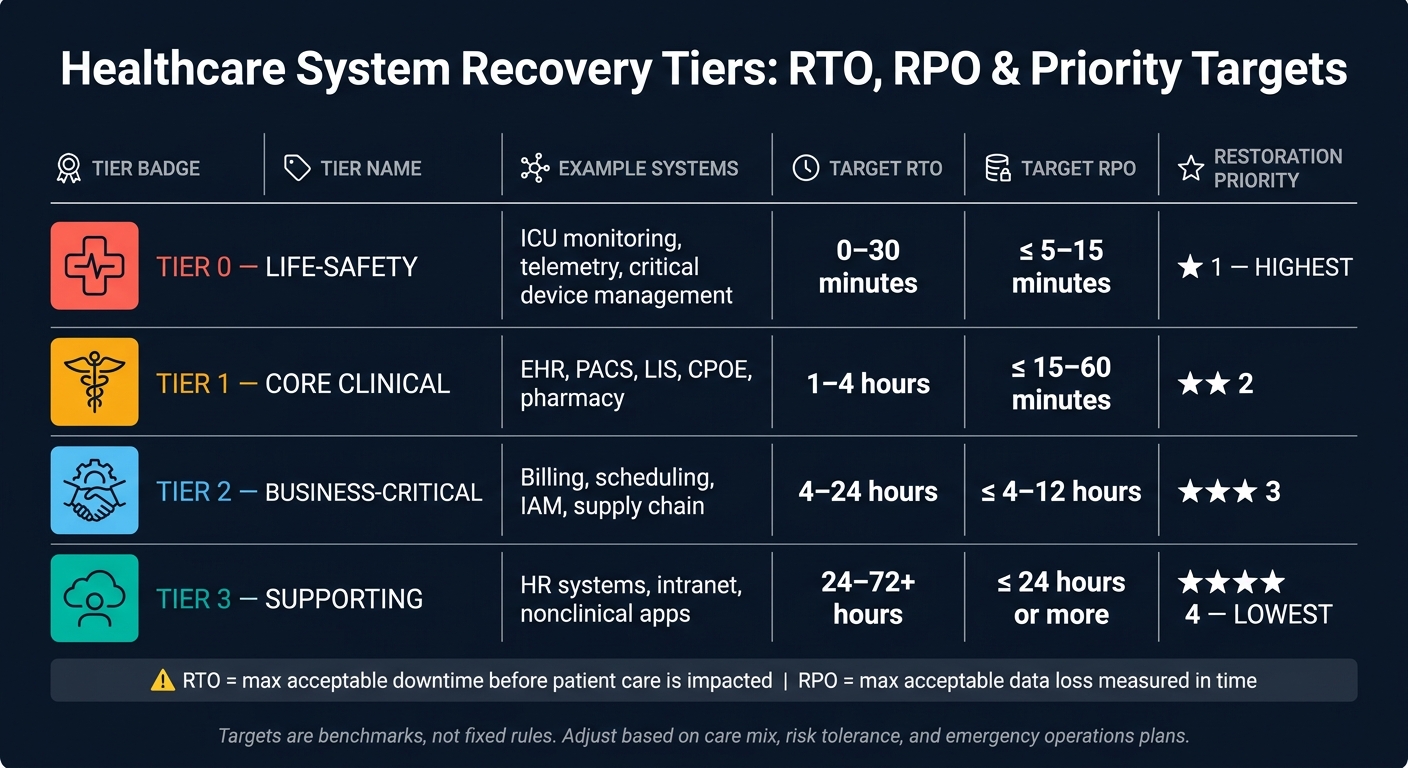
Healthcare IT Recovery Tiers: RTO, RPO & Priority Targets
Start with HIPAA contingency plan rules and each system’s acceptable downtime and data loss. Those targets shape what your backup setup must restore.
HIPAA requires a contingency plan that covers backup, disaster recovery, emergency mode operations, testing and revision, and criticality analysis. Use that criticality analysis to set risk-based RTO and RPO targets.[7][4][6]
RTO is the maximum downtime a system can have before the effect on patient care, safety, or operations becomes unacceptable. RPO is the maximum data loss a business can tolerate, measured in time, like minutes or hours. A daily backup creates a 24-hour RPO.[10][12][13] For a high-risk clinical system, that gap may be far too long. For a lower-risk administrative system, it’s often workable.
Define RTO and RPO by Recovery Tier
Not every system should get the same recovery priority. A good starting point is to group systems into tiers based on patient-safety impact, clinical dependence, and regulatory risk, then assign RTO and RPO targets to each one. This shouldn’t be an IT-only exercise. Clinical leadership and risk management need a seat at the table too.
A common four-tier model uses the following starting benchmarks.[7][11][12][13]
| System Tier | Example Systems | Target RTO | Target RPO | Restoration Priority |
|---|---|---|---|---|
| Life-safety | ICU monitoring, telemetry, critical device management | 0–30 minutes | ≤ 5–15 minutes | 1 (highest) |
| Core clinical | EHR, PACS, LIS, CPOE, pharmacy | 1–4 hours | ≤ 15–60 minutes | 2 |
| Business-critical | Billing, scheduling, IAM, supply chain | 4–24 hours | ≤ 4–12 hours | 3 |
| Supporting | HR systems, intranet, nonclinical apps | 24–72+ hours | ≤ 24 hours or more | 4 (lowest) |
These numbers are examples, not fixed rules. An acute care hospital, an ambulatory practice, and a specialty facility may land in very different places based on care mix and risk tolerance. It also helps to line these tiers up with emergency operations plans, so downtime procedures can cover the gap between the target recovery time and what happens in practice.[7][11][12] After that, you need to map the systems each tier relies on.
Inventory ePHI Systems and Map Dependencies
You can’t set recovery targets for systems you haven’t identified. A solid ePHI inventory blends a top-down review of application portfolios, CMDBs, and vendor lists with a bottom-up review of data flows, interface engines, and network segments. That’s often how teams find shadow IT, department-owned tools, and SaaS apps that aren’t in the main catalog but still store or transmit ePHI.[7][6][13]
Common ePHI sources include:
- EHR platforms, PACS, LIS, RIS, and EMPI
- Patient portals, billing and revenue cycle systems, care management tools, connected medical devices, and cloud-hosted clinical applications
For each system in the inventory, record the system owner, hosting location, vendor, data types handled, care settings served, recovery tier, and assigned RTO/RPO targets.
Once the inventory is done, map dependencies using architecture diagrams, CMDB relationships, and input from system owners. This shows the real restoration order and exposes single points of failure. An EHR, for example, often depends on primary and standby databases, an application tier, virtual infrastructure, storage, Active Directory or SSO, VPN access, and interfaces to lab, pharmacy, and imaging systems.[7][6] That dependency map is what turns a recovery plan from a spreadsheet into something your team can actually use.
Design a Backup Architecture That Supports Fast, Verifiable Recovery
Once you know your recovery tiers and system dependencies, the next step is building a backup architecture that can actually hit those RTO and RPO targets. Backup design is what decides whether those targets are possible in practice. Use the dependency map to assign each workload the backup method that fits its recovery tier.
Choose Backup Methods by Workload and Recovery Need
Match each workload to the backup method that best supports its RTO and RPO.
Database-aware backups fit transactional systems such as EHR databases, pharmacy platforms, and clinical registries. They preserve a consistent state for point-in-time recovery. When you pair them with log shipping or continuous backup, they can support RPOs in the 5- to 15-minute range for Tier 0 and Tier 1 systems.[16][20]
Image-based backups fit application servers, PACS servers, and departmental systems with lower recovery urgency. A VM or bare-metal image can be restored at a DR site or in the cloud with little manual setup. That makes this method a good match for RTO targets in the minutes-to-hours range.[18][20]
Storage snapshots are best for short-term rollback. They can capture a point-in-time copy of an EHR file system or VDI environment in seconds, with very short RPOs - often seconds to minutes. But there’s a catch: snapshots often share production storage, so they do not protect against storage failure or ransomware. Use them with a full backup method, not as your only recovery path.[16][18]
A practical design gives each workload a primary and a secondary method. For example, an EHR application server might use hourly snapshots plus daily image-based backups, while the database underneath it uses application-consistent backups with log shipping. That setup gives you fast rollback for small issues and a full restore path for larger failures.
Method choice handles speed. Copy design handles resilience.
Apply the 3-2-1-1-0 Rule and Security Controls
The 3-2-1-1-0 rule is the standard framework for backup resilience in healthcare.[17][1] It means:
- 3 copies
- 2 media types
- 1 offsite copy
- 1 immutable or offline copy
- 0 unverified backup errors
The goal is simple: keep at least one clean copy available if production storage or the primary network gets hit.
A common healthcare setup looks like this: production data in the primary data center (copy 1), daily backups to a local disk-based backup appliance (copy 2, media type 1), and replicated backups to encrypted cloud object storage with immutability enabled (copy 3, media type 2, offsite, immutable). For highly critical systems, a weekly air-gapped copy written to WORM storage or a physically isolated repository adds another layer of ransomware protection.[17][19]
The "0" matters more than people think. A backup job counts only after validation. Run automated integrity checks, such as checksum or hash validation, after every backup job. Then schedule regular test restores to a sandbox or alternate environment. Mission-critical systems should be tested on a regular schedule.[21][22]
Encrypt all backup data in transit and at rest with AES-256 or an equivalent method, using centralized key management and regular key rotation.[15][18] Enforce MFA on all backup administrative accounts. Apply least privilege so backup operators, security teams, and auditors each get only the access they need. Log every privileged action.
It also helps to separate backup admin access from production identity systems. Use a dedicated backup environment, isolated jump hosts, and separate credentials with MFA so that a compromised Active Directory does not automatically expose your backup infrastructure.[14][5][15] Once access controls and immutability are in place, retention rules decide how long each copy must remain recoverable.
Retention policies should be defined by data type and aligned with clinical, PHI, and record-retention requirements. A tiered model works well: keep recent backups on fast disk for quick recovery, and move older copies to lower-cost cloud archive storage or tape. Document these policies in formal terms, get sign-off from compliance and legal, and audit them on a set schedule to confirm that live backup settings match what is written down.[4][5][15]
Build a Recovery Workflow That Restores Life-Safety and Core Clinical Systems First
Once recovery targets and dependencies are set, the next job is deciding what comes back first.
A backup setup is only as good as the recovery workflow behind it. You can have clean, immutable copies of data, but that doesn't help much if the team can't answer three basic questions: what gets restored first, in what order, and how do we know it's safe to use again? This is the point where planning turns into action.
Follow a Structured Restoration Sequence
One of the most common mistakes is restoring whatever is easiest instead of restoring what patient care depends on. Recovery order should follow patient safety and system dependency, not convenience.
Start with detection and containment. Isolate affected systems, segment the network to stop spread, and document exactly what was hit. Keep paper workflows in place until restored systems are checked and approved. Downtime procedures should already be trained and easy to access before an incident happens.
Then use the recovery tiers and dependency map to guide the sequence. Restore systems based on clinical priority. After containment, run a backup integrity check. Scan candidate backups for malware and verify integrity before restoring anything into production. If the backup is compromised, you can end up putting the same problem right back into the environment.
From there, restore by dependency order. Core infrastructure comes first: domain controllers, DNS/DHCP, certificate authorities, SSO/identity services, storage and backup infrastructure, core network switches, firewalls, and security monitoring tools such as SIEM and EDR. Identity, network, and storage services need to come back first because clinical systems rely on them to sign users in and move data.
Once that base layer is stable, move to clinical application layers by tier. Check each layer before moving to the next one.
Use a Phase-Based Recovery Order Table
The table below turns dependency order into a recovery sequence. These are priorities, not promises.
| Phase | Restoration Order | Restore Priority | Example Systems |
|---|---|---|---|
| Core Infrastructure | 1 | First | Domain controllers, DNS/DHCP, SSO/identity, storage and backup infrastructure, core network switches, firewalls, SIEM/EDR |
| Life-Safety / Clinical | 2 | Immediate | EHR, medication administration, lab ordering/results, pharmacy, ED workflows, patient monitoring |
| Revenue & Administrative | 3 | After clinical systems are restored | Scheduling, billing, claims, insurance verification |
| Lower-Priority Support Services | 4 | Last | Reporting/analytics, imaging archives, HR systems, intranet tools |
Lab and medication systems are in Phase 2 for a reason. Analysis of patient safety event reports found that 48.7% of EHR downtime-related safety events involved lab orders and results, and 14.5% were tied to medication ordering and administration.[3][23] Getting those systems back online - and making sure they work as expected - is a patient safety issue, not just an operations issue.
Document Runbooks, Roles, and Escalation Paths
Every critical system should have its own runbook stored offline. That runbook should cover the system owner, dependencies, restore steps, break-glass access, paper downtime workflows, and validation steps. If the runbooks live only inside systems you're trying to recover, they're no help during an outage.
Roles need to be set ahead of time. Clinical leaders decide which workflows must return first. Compliance and legal advise on regulatory risk. Communications teams handle internal and external updates. Executives approve major tradeoffs or emergency spending. In a crisis, nobody wants to figure this out on the fly.
Escalation criteria need the same level of clarity. Bring in executives when core clinical systems exceed their RTO, when backup integrity is uncertain, when patient safety is at risk, or when manual operations must continue across departments for an extended period. Those thresholds should be written down, not left to gut instinct in the middle of an outage.
Third-party risk management data can help move recovery along when vendors, cloud services, or device suppliers are part of the picture. And before any restored system is released for broad use, run integrity, functional, and security checks. Clinical or department owners should sign off before wider release, especially for systems tied to direct patient care.
Use restore tests to prove this sequence works when the pressure is on.
Test, Measure, and Improve Recovery Performance Over Time
Once the recovery order is set, put it to the test on a fixed schedule. An untested backup is just an assumption, not a recovery plan. In healthcare, problems like corruption, bad configuration, or missing dependencies often don’t show up until a restore starts. That can turn downtime into a direct patient-safety issue. Runbooks only hold up when the restore order has been tested in practice. HIPAA’s contingency plan standard also expects tested recovery capabilities, a key metric in healthcare cybersecurity benchmarking for ePHI and the systems that support it.[24][25][26]
Run Restore Tests on a Defined Schedule
Use three test cadences. Start small, then work up to full-system and scenario-based testing. In each case, stick to the same recovery tier and dependency order defined earlier.
- Monthly: Spot-restore individual files, databases, or VMs to confirm backup integrity and restore paths.
- Quarterly: Run full-application restores or partial failovers for priority systems like EHR, pharmacy, and lab.
- Annually: Hold scenario-based exercises with IT, security, clinical, and compliance teams. Cover ransomware, data corruption, regional outages, plus failover and failback cases.[27][8][28][2]
Each test should produce evidence, not just a pass/fail check. Record start and end timestamps, the systems involved, the age of restored data, and whether clinical workflows worked as expected. Save logs, screenshots, and reconciliation reports. Also document blockers and their causes.[27][28][2] That record helps support HIPAA audits.[24][25][9][26]
Update Targets, Controls, and Documentation After Each Test
Testing only helps if the findings lead to changes. After every exercise or real incident, update runbooks, dependency records, and restore steps based on what happened. If a system took longer to restore than planned, move it up in recovery priority or tighten its RTO/RPO. If a control gap showed up, like a backup that wasn’t immutable or a dependency that wasn’t documented, fix it before the next test.[27][6][28][2]
Recheck RTO and RPO targets after workflow changes, new systems, or major EHR upgrades, and revise those targets when needed.[8][28][2] Each test should narrow the gap between the plan on paper and what your team can actually restore under pressure.
FAQs
How do we set RTO and RPO for each system?
Start with a business impact analysis and an application criticality review. Rank each system based on how much it affects patient safety, clinical operations, and compliance. Then assign recovery tiers.
Set RTO and RPO by tier:
- Tier 0: near-zero RPO (≤15 minutes) and RTO (≤1 hour)
- Tier 1: RPO ≤1 hour and RTO 1–4 hours
- Tier 2: RPO 4–8 hours and RTO 4–24 hours
- Tier 3: RPO 24+ hours and RTO over 24 hours
Document these targets, get formal approval, and test them on a regular basis.
What should we restore first during an outage?
Restore systems based on clinical impact and dependencies so patient safety stays protected and day-to-day work can continue.
Start with infrastructure and databases. Then bring back core applications and interfaces. After that, restore reporting tools and other lower-priority systems.
Use your criticality analysis to set this order. The goal is simple: life-safety services and other high-priority systems, such as EHRs and authentication systems, should come back online within their recovery time objectives.
How often should we test backup restores?
Healthcare organizations shouldn’t stop at the minimum annual requirement. A risk-based schedule works better than a one-size-fits-all plan.
A solid approach looks like this:
- Daily automated backup checks
- Monthly file or database restores
- Quarterly drills for critical systems and ePHI
- At least annual full-scale disaster recovery exercises
Document all results to support compliance and day-to-day readiness.
