
In an emergency, patient data must move in seconds - but access still needs limits, logs, and clear rules. HIPAA does not block emergency care. It allows PHI sharing for treatment, public health, disaster relief, serious threats, and some law-enforcement cases. But each path has rules, and teams need those rules set before a crisis starts.
Here’s the short version:
- Treatment sharing is allowed without patient authorization, and the minimum necessary rule does not apply there.
- Public health, disaster relief, and law-enforcement disclosures still need tighter limits.
- Shared devices, open sessions, texting, and downtime workarounds are some of the biggest risk points.
- 79% of healthcare respondents said staff still share credentials on shared mobile devices.
- 74% said devices are often left signed in after use.
- 21% of healthcare data incidents involved sending PHI or PII to the wrong recipient.
- Break-glass access should be limited, time-bound, and fully logged.
- Medical device encryption, MFA, session timeouts, secure messaging, MDM, and audit logs are core controls.
- If a federal emergency waiver applies, it is narrow and can last only up to 72 hours after a hospital activates its disaster protocol.
What this means for you is simple: the safest emergency data-sharing setup is one where people know what they can share, who can receive it, which tool to use, and when access must end.
A few points stand out from the article:
- Fast care and privacy are not opposites.
- HIPAA is permission-based, not a free pass.
- The treatment exception is narrower than many teams think.
- The fastest workflow should also be the one with less data exposure.
- Post-event review matters just as much as the live event.
If I boil the article down even more, it comes to four jobs:
- Pick the right HIPAA pathway
- Lock down devices and messaging
- Control emergency overrides
- Review, revoke, and document everything after the event
This article then walks through the risks, the HIPAA rules, the controls for EMS, ED, telehealth, and mobile use, plus the governance steps that keep emergency access from turning into uncontrolled disclosure.
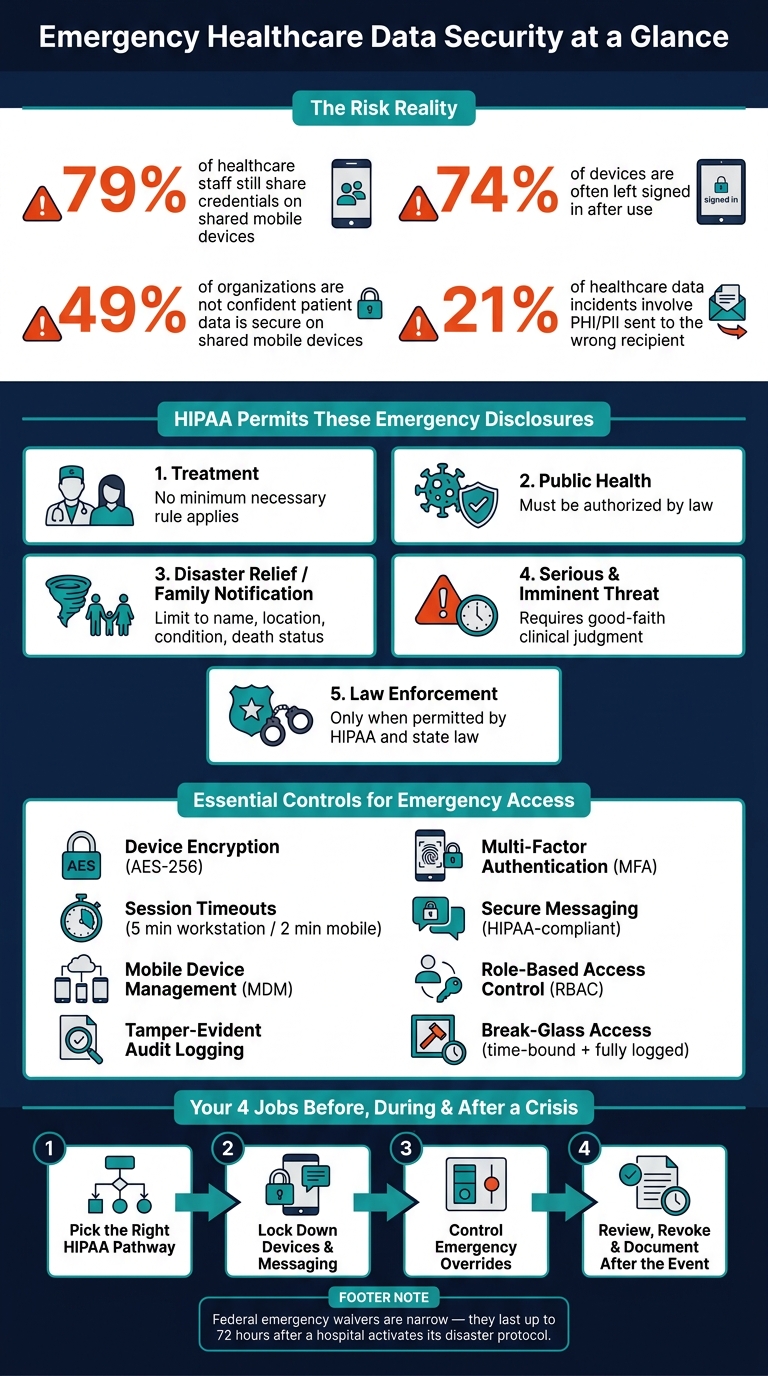
Real-Time Healthcare Data Security: Key Risk Stats & HIPAA Emergency Controls
Real-time data sharing risks in emergency healthcare
These weak spots tend to show up in the same few workflows again and again. Emergency care is a high-risk setting for PHI and ePHI because the pace of work creates openings. The biggest trouble spots are shared devices, messaging, and downtime workarounds.
Where emergency workflows create the highest exposure
Shared workstations and mobile devices are the most common trouble areas. A 2025 survey found that 79% of healthcare respondents said staff still share credentials on shared mobile devices, 74% said devices are often left signed in after use, and 49% were not confident patient data is secure on shared mobile devices.[12] In an ED or ambulance, that can mean the next user steps into an open session, which makes it hard to tell who accessed what.
Ambulance tablets bring many of the same problems. EMS crews use them in public places and under intense time pressure, so the odds of device loss, theft, screen viewing by others, or unauthorized access after handoff go up.[3] Connected medical devices - such as bedside monitors, infusion pumps, and ventilators - add another point of risk. If those devices lack proper authentication or patching, they can become an entry point for ransomware or a way to move into other systems, especially during surge events when IT review may be thinner.[7][8]
Clinician-to-clinician messaging is another weak spot. Standard SMS and consumer messaging apps do not have enterprise controls or audit logs. In a Ponemon Institute study cited by Proofpoint, 21% of healthcare data incidents involved employees sending PHI or PII to an unintended recipient.[9] In an emergency, when staff may text vitals or medication details to coordinate care fast, that risk gets worse. Verbal communication in public triage areas has its own problem too. Overhead paging and open conversations can be heard by bystanders, media, or non-authorized staff without anyone noticing in the moment.[5]
| Risk Type | Likely Impact | Primary Control |
|---|---|---|
| Shared devices and persistent sessions | Unattributable PHI access, audit gaps | Individual authentication, auto-logout policies |
| Lost or stolen mobile devices | Unsecured ePHI exposure, breach notification risk | Device encryption, remote wipe, MDM enforcement |
| Insecure messaging (SMS, consumer apps) | Unintended PHI disclosure | HIPAA-compliant secure messaging with audit logging |
| Downtime workarounds (paper, local files) | Untracked PHI repositories, clinical errors | Pre-defined downtime forms, secure storage, post-event reconciliation |
| Missing audit trails | Inability to detect or investigate misuse | Audit logging, access review, post-event accountability |
| Connected medical devices | Network infiltration, ransomware spread | Device hardening, patching, vendor risk assessment |
When primary systems go down - whether from a cyberattack, power failure, or planned maintenance - teams often switch to paper charts, handwritten notes, unsecured spreadsheets, or files stored locally. That may keep care moving, but it can also skip HIPAA safeguards. Data may sit in plain view, end up on unsecured devices, or never make it back into the EHR.[5][7]
How speed affects the minimum necessary standard
Fast action does not erase the minimum necessary standard; it changes where the rule applies. For direct treatment, HIPAA does not require clinicians to limit what they access or share. A treating provider can use all relevant information needed to care for the patient.[6][4] But that treatment exception is narrower than many people think. It applies to treatment. It does not apply to operational uses, public health reporting, or disclosures to non-treating parties. Those still need minimum necessary review, even during a declared emergency.[2][5][6]
In practice, the mistake is often simple. A clinician may open a full chart when only the medication list is needed, or send a broad export when a short summary would do. These are usually speed-and-stress problems, not bad intent. A better setup helps. EHR views and dashboards should show only the data categories tied to common ED or EMS situations, so the fastest option is also the one with less exposure.[11][10] Staff also need training on which disclosures fall outside the treatment exception, and when to bring questions to privacy or compliance teams. That’s where speed tends to create gaps.
sbb-itb-535baee
HIPAA, Privacy Rule, and emergency disclosure requirements
After the risk map comes the legal map: which emergency disclosures HIPAA allows, and where the limits are. HIPAA does not go away during an emergency. The main issue is simpler than it sounds: which disclosure pathway fits this situation? In most cases, you still need a permitted HIPAA pathway before sharing PHI.
Permitted disclosures for treatment, public health, and disaster response
The Privacy Rule allows some emergency disclosures without patient authorization. The simplest way to avoid sharing too much is to match the event to the right HIPAA pathway. Each one has its own guardrails.
| Disclosure Type | Who Can Receive PHI | Key Limitation |
|---|---|---|
| Treatment | Other providers involved in the patient's care, such as an ED sending information to a trauma center | Minimum necessary does not apply for treatment disclosures |
| Public health | Public health authorities such as the CDC or state and local health departments authorized by law | Must be authorized by law and tied to the public health purpose |
| Disaster relief / family notification | Family, friends, guardians, and disaster relief organizations such as the American Red Cross | Limit to what the patient would likely permit, usually name, location, condition, or death status. For incapacitated patients, share only what is in the patient's best interest. |
| Serious and imminent threat | Anyone reasonably able to prevent or lessen the harm, including law enforcement | Requires good-faith clinical judgment and must follow applicable law |
| Law enforcement | Officers responding to specific permitted circumstances, such as reporting certain injuries required by law or a suspicious death | Only when permitted by HIPAA and state law |
One point matters a lot here: for treatment disclosures, minimum necessary does not apply. For public health, disaster relief, serious-threat, and law enforcement disclosures, it still does.
Reasonable safeguards, documentation, and notice timing
Permission by itself is not enough. Each disclosure still needs safeguards, documentation, and role verification. Even when the law allows a disclosure, the organization should verify who is receiving the data, confirm that person's authority, and share only what the moment calls for.
In day-to-day terms, that could mean confirming an EMS agency's credentials before giving remote EHR access. Or checking that a disaster relief liaison is approved before sharing patient location data. The rule of thumb is plain: allowed does not mean unlimited.
Documentation matters just as much as the disclosure itself. For each emergency-related disclosure, organizations should record:
- Date and time
- Recipient
- Legal basis
- Data shared
- Reason for the disclosure
Those records help with post-event review, show where over-sharing may be happening with certain partners, and create a paper trail if a complaint or audit comes later.
Notice timing has its own twist. If the President declares an emergency or disaster and the HHS Secretary declares a public health emergency, HHS may issue a limited waiver of certain Privacy Rule requirements for covered hospitals that have activated a disaster protocol. That waiver is narrow. It applies only in the emergency area and for the emergency period, and it lasts up to 72 hours after the hospital activates its disaster protocol.[15][1][16]
During that short window, some duties may be relaxed for a time, such as distributing notices of privacy practices and honoring certain confidential communication requests. Once the 72-hour window ends, the usual duties come back into force. That is why organizations need a clear plan for the handoff back to normal operations, including catching up on notice delivery and documentation after the urgent phase passes.
The framing that tends to hold up in all of these cases is straightforward: treat emergency sharing as permission-based, not exemption-based. Before disclosing anything, identify the Privacy Rule pathway that applies. Then use the safeguards tied to that pathway. Tools like Censinet RiskOps™ can help track third-party access, document disclosure rationales, and manage third-party vendor risk across emergency data exchanges - keeping PHI disclosures controlled and auditable even when operations are moving fast.[13][14]
Security controls for real-time data sharing
Once the disclosure path is in place, the next job is simple: keep emergency sharing fast without letting it sprawl. That’s where technical controls come in. Each one supports a different security goal, and some pull double duty.
| Control | Confidentiality | Integrity | Availability | Access Control |
|---|---|---|---|---|
| Encryption in transit (TLS 1.2+/1.3) | ✓ | |||
| Encryption at rest (AES-256) | ✓ | ✓ | ||
| Multi-factor authentication (MFA) | ✓ | |||
| Role-based access control (RBAC) | ✓ | ✓ | ||
| Tamper-evident audit logging | ✓ | ✓ | ||
| Secure messaging (HIPAA-compliant) | ✓ | |||
| Session timeouts / screen lock | ✓ | ✓ | ||
| Mobile device management (MDM) | ✓ | ✓ | ✓ | |
| Network segmentation | ✓ | ✓ | ✓ | |
| Redundant encrypted backups | ✓ | |||
| Break-glass access with monitoring | ✓ | ✓ | ✓ |
Controls for EMS, ED, telehealth, and mobile access
EMS tablets carry a lot of risk because they’re used in uncontrolled settings. A device can be left in an ambulance, handled in the field, or used in the middle of chaos. So the basics matter: full-disk encryption, a PIN-plus-biometric login, and access to hospital systems only through a VPN or zero-trust tunnel. MDM should lock each tablet to approved clinical apps, block consumer messaging apps from touching PHI, and allow remote wipe if a device disappears during a call. NIST SP 800-66r2 includes removable media, portable computing devices, and IoT medical devices within the healthcare security scope, which makes EMS hardware a clear fit.[26]
ED dashboards have a different problem. These are shared workstations, used by rotating staff, often under pressure. In that setting, long idle sessions are asking for trouble. Short session timeouts are the practical answer. HIPAA technical safeguard guidance points to about 5 minutes of inactivity before a workstation locks and 2 minutes or less for mobile devices, with a biometric or PIN required to resume.[7] Rapid user-switching can also help cut down on credential sharing.
Telehealth and remote triage add another layer. Real-time audio and video need end-to-end encryption across both signaling and media streams. WebRTC with DTLS-SRTP is one workable option. Password-protected sessions, waiting rooms, and unique session IDs help keep uninvited people out of emergency consults.[19][21] Provider devices also need firewalls and intrusion detection, because telehealth opens more points of entry for attack.[28]
For clinician smartphones and on-call access, MFA has to be set up in a way that doesn’t slow care at the worst moment. Hardware tokens, biometrics, or smartcard-based flows can meet the two-factor rule without dragging a clinician through a long login during a critical event. US EMS guidance specifically recommends at least two device access points - such as a PIN plus fingerprint or a smartcard swipe - for devices that store or transmit NEMSIS data.[22]
Break-glass access and post-event accountability
Break-glass access is a policy-defined emergency override for cases where normal access is too slow or simply unavailable. That might happen when an unconscious patient arrives without prior registration, or when systems are partly down during a major incident.
When a clinician triggers break-glass, the system should ask for a standardized reason or a short free-text explanation before access expands. That override should stay as narrow as possible: ideally view-only, limited to the local network, and focused on data access instead of full edit or export rights.[25] It also needs a time limit, with automatic revocation when the incident ends, so elevated access doesn’t linger in the background.
Every break-glass event must create a full log entry: who triggered it, which records were opened, what actions were taken, and when elevated access ended.[17][20][23] Those logs should sit in a tamper-resistant, append-only store. Hashing and synchronized timestamps help preserve chain of custody if a regulatory review or legal issue comes later.[18][20][24] HIPAA emergency access guidance recommends annual drills for break-glass procedures and says emergency access mechanisms should be part of periodic risk assessments.[27]
Post-event review should happen within a set time after each activation. That gives privacy, security, or clinical leadership a chance to confirm the override made sense, spot any over-access, and see whether repeat patterns point to policy gaps or training problems. A centralized risk-management workflow can track break-glass events, third-party access, and device risk. None of this works by accident. Ownership, escalation, and revocation need to be set before the emergency begins.
Emergency workflows, implementation roadmap, and governance
After you put controls in place, the next step is setting the rules that make those controls usable in a crisis. Security measures only hold up when emergency teams can use them the same way, every time, even when the pressure is high.
Workflows for sharing, escalation, and access revocation
Every emergency data-sharing workflow should answer four questions before an incident starts:
- Who can share
- What data
- Which approved channel
- During which incident phase
If those rules aren't written down, people usually take the fastest route.
Role definitions need to be specific. That's how the minimum-necessary standard works in day-to-day practice during an emergency. EMS crews usually need allergies, current medications, and emergency contacts, not a full longitudinal record. ED attending physicians may need more, including prior imaging and consult notes. Incident command usually works from de-identified or aggregated data for resource coordination, not individual patient records. When these lines are mapped ahead of time, teams don't have to guess when time is short.
Escalation should move in a clear path: role-based access, then supervisor approval, then emergency override. Each step should require a documented reason. High-risk overrides should be routed for real-time review or batch review, based on timing.
Emergency permissions should roll back on their own when normal operations resume. Temporary external accounts should be disabled right away. IT and security should confirm that cleanup happened. After the event, an access review should compare each escalated permission against the documented clinical need.
Governance, vendor oversight, and continuous review
Governance works best when each group has a clear job. Clinical leadership decides which use cases call for expanded access. IT builds and maintains the systems. The security team watches access logs, spots anomalies, and runs tabletop exercises that include cyber-physical scenarios. The privacy and compliance office interprets HIPAA rules in emergency settings and reviews emergency disclosures for fit. Incident command activates protocols and coordinates across teams. A RACI matrix helps cut overlap and confusion when every minute counts.
Vendor oversight needs the same level of care. Business associate agreements should do more than include stock language. They should spell out uptime targets, disaster recovery time objectives, shared incident-response duties, and exact requirements for audit logs that cover emergency access and cross-organizational data exchange. Vendors should also take part in tabletop exercises, not just sign paperwork. Best-practice guidance recommends quarterly tabletop exercises that include clinical leadership, not only IT, as a minimum prep baseline.[30] Use Censinet RiskOps™ to track third-party assessments, benchmark vendor controls, and document remediation for emergency-critical systems.
Once vendor duties are set, the next job is to track them through drills and access metrics. Continuous monitoring should focus on a small set of clear indicators: break-glass activations per month, time-to-access for critical data during drills, unauthorized access attempts, and audit findings from post-incident reviews. In plain terms, track break-glass volume, drill access times, unauthorized attempts, and post-incident findings. Use the 60-day breach-notification deadline to push review speed.[29]
Conclusion: Building a secure emergency data exchange model
Emergency speed and data security are a design problem, not a tradeoff. The strongest programs set roles, standardize channels, test workflows, and govern access before a crisis starts. That's what keeps care moving without letting security slip.
FAQs
When does HIPAA allow PHI sharing in an emergency?
In an emergency, HIPAA may ease some Privacy Rule requirements. But it does not erase the duty to protect ePHI. The HIPAA Security Rule still stays in force.
That means organizations still need to follow the minimum necessary standard. They also need to keep encryption in place for data at rest and in transit, and make sure contingency plans still work when normal operations are disrupted.
What counts as break-glass access?
Break-glass access is an emergency protocol that lets authorized healthcare staff bypass standard access controls to get restricted ePHI or use critical systems during urgent, life-threatening situations, so patient care isn't delayed.
To support HIPAA compliance, it should include documented justification, multi-factor authentication, strict time limits, audit logging, and a post-incident review to confirm medical need and spot misuse.
How should hospitals secure shared devices during emergencies?
Hospitals need to lock down core security controls without getting in the way of care. For shared mobile devices like WOWs, crash-cart laptops, and tablets, full-disk encryption managed through MDM helps cut the risk if a device is lost or stolen.
Some legacy or specialized devices can’t support encryption. In those cases, isolate them on encrypted VLANs with IPsec tunnels instead. Use the LOCK checklist to secure sessions, and manage oversight in one place with Censinet RiskOps for inventory, risk assessments, and vendor security standards.
